Introduction
The Yavin API lets developers and integrators embed payment functionalities into their own user journeys: process payments on a terminal, generate online payment links, print and share receipts, and access transaction data.
Typical use cases: payment on terminal from a POS, kiosk payment, Click & Collect online payment, Order & Pay via QR code, Pay at Table via QR code.
Choose your integration
Answer one question first: where does the payment happen?
| Your situation | Integration to use |
|---|---|
| POS and Yavin Pay on the same Android device | Android Intent API |
| POS on a different device, same local network as the terminal | Local API |
| POS on a different network, or web-based POS | Cloud API |
| Online payment by link (ecommerce, QR code, Pay at Table) | Ecommerce API |
| Server-to-server reporting and refunds | Webservices API |
The three in-store APIs (Local, Cloud, Android Intent) expose the same payment features. The difference is only the transport: local HTTP, cloud HTTPS with webhooks, or Android deep links. Choose based on your network topology, then keep the same integration everywhere.
Set up your sandbox
Please contact our team at partnerships@yavin.com in order to get a sandbox environment as well as a test terminal if need be.
Sandbox specifics
- Base URL: replace
api.yavin.comwithapi.sandbox.yavin.com(identical paths). The Local API is unaffected (local network); its HTTPS add-on uses dedicated sandbox hostnames - Credentials are fully separate: a sandbox API key never works in production, and vice versa. The sandbox backoffice displays an orange SANDBOX banner at all times
- The sandbox backoffice is accessible through this link : my.sandbox.yavin.com
- The sandbox ecommerce payment page uses no test cards: the payment is validated as soon as you click Pay
Authentication
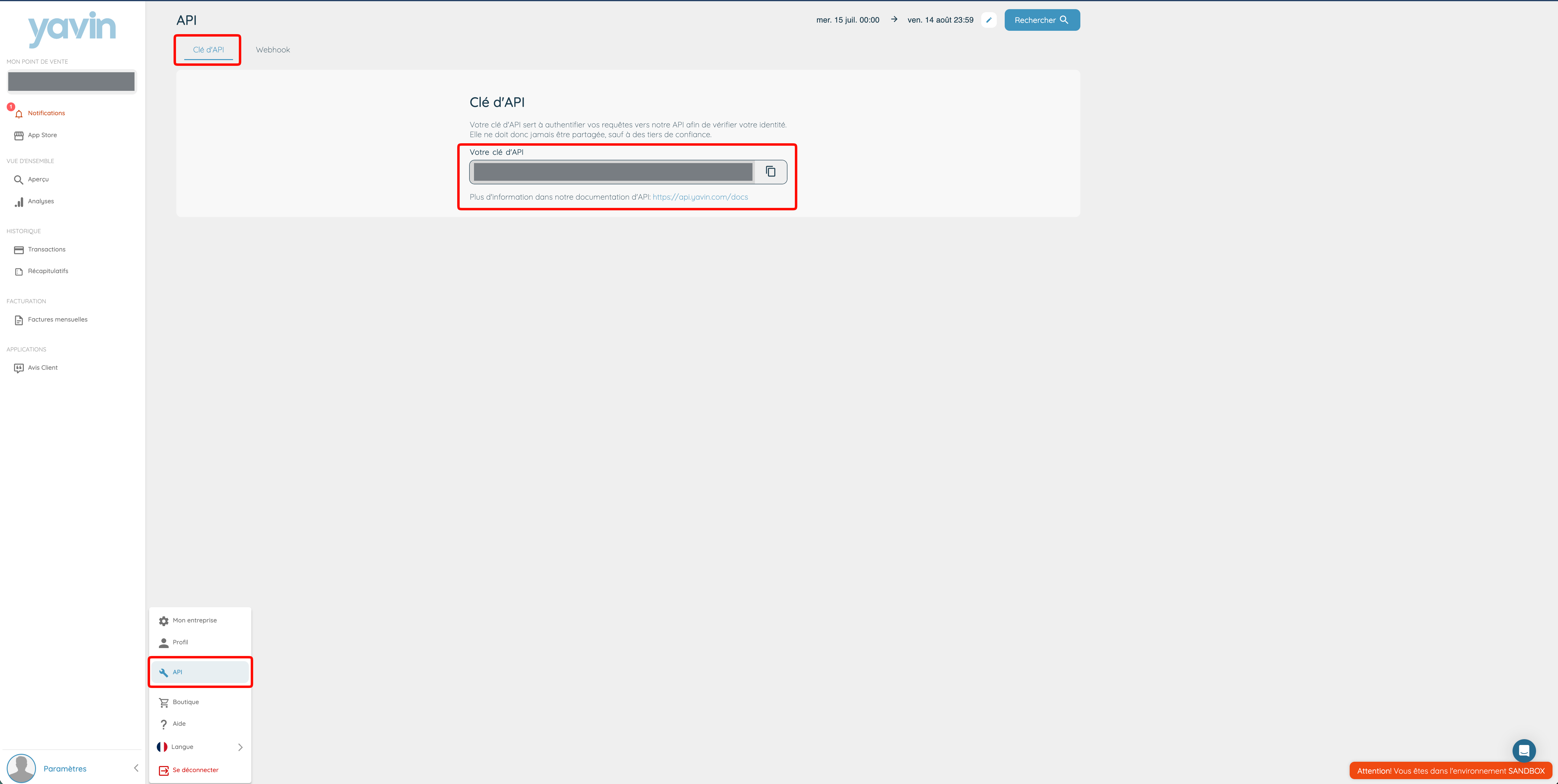
Yavin uses a company object to represent a physical point of sale. Each company has its own API key, available on my.yavin.com in the API tab.
| API | Authentication |
|---|---|
| Local API | Merchant login in Yavin Pay with My Yavin credentials |
| Android Intent API | Merchant login in Yavin Pay with My Yavin credentials |
| Cloud API | API key in the Authorization: Bearer YOUR_API_KEY header |
| Ecommerce API | API key in the Yavin-Secret header |
| Webservices API | API key in the Yavin-Secret header |
Every HTTPS request must be authenticated and must carry Content-Type: application/json.
Conventions
- Amounts are always integers, in cents, and must be positive (
1000= 10,00 €). Never send a negative amount: not every API rejects it (on the Android Intent API, its absolute value is charged) - Currency codes are ISO 4217 (
EUR,CHF,GBP). The currency actually used is the one configured on the merchant profile - Statuses: in-store transaction results are
okorko; ecommerce checkouts addpendingandauthorised - Idempotency: always send an
idempotentUuidon payment requests, one per payment attempt. See IdempotentUuid Management - Naming: the convention (camelCase or snake_case) varies by API and is stated at the top of each API page
In-store payment flow
Local, Cloud and Android Intent APIs are used for in-store payments only.
- The merchant selects the items or the amount on the POS
- The merchant taps the payment button on the POS
- The POS calls the payment route with type
debitand anidempotentUuid - The customer pays on the terminal
Successful payment: the response is taken into account on the POS, including tips (as overpayment, "trop perçu") if any.
Failed payment, in any of these cases the payment is killed, the response reaches the POS, and you can start a new payment (with a new idempotentUuid):
- The customer takes more than 60 seconds on the tips or review screens
- The customer takes more than 60 seconds to present the card
- The card is declined by the payment gateway
Online payment flow
- The customer selects items on your website and clicks pay; your server is notified
- Your server calls the Yavin API to generate a payment link
- The Yavin server returns a unique payment link
- Your server redirects the customer to the payment link (Yavin-hosted page)
- The customer enters their payment information in the widget
- Yavin calls your
return_url_successorreturn_url_cancelled(GET withcartIdandstatusin the query params) and yourwebhook_urlwith the checkout result - Your server handles the result and displays the relevant information to the customer
See the Ecommerce API page for capture modes (instant vs deferred), payment link lifetime, statuses, and multi-payment behaviour.
HTTP error codes
| Code | Meaning |
|---|---|
| 400 | Bad Request: the request is invalid (a missing Content-Type: application/json header is the most frequent cause) |
| 401 | Unauthorized: the API key is invalid or the terminal cannot be accessed with this API key |
| 404 | Not Found: the route does not exist |
| 405 | Method Not Allowed: wrong HTTP method for this route |
| 500 | Internal Server Error: issue on our side, try again later and contact support if it persists |
Error response formats
The error body shape depends on the endpoint family. Write one handler per shape; do not assume a single format across APIs.
| Endpoints | Error body | Example |
|---|---|---|
| In-store payment endpoints (Local API with HTTP 200, Cloud API) | {"status": "ko", "message": "..."} | {"status": "ko", "message": "Error: amount needs to be greater than 0"} |
Ecommerce /generate_link/ (validation) | {"errors": {"field": ["message"]}} | {"errors": {"checkout_external_id": ["This checkout_external_id already exists"]}} |
Ecommerce /cancel_link/, /capture_transactions/, /get_cart_information/ | {"error": "..."} | {"error": "Cart has already been cancelled"} |
| Webservices refund, 400 malformed request | One object keyed by field | {"amount": ["cannot be greater than the transaction's total amount"]} |